
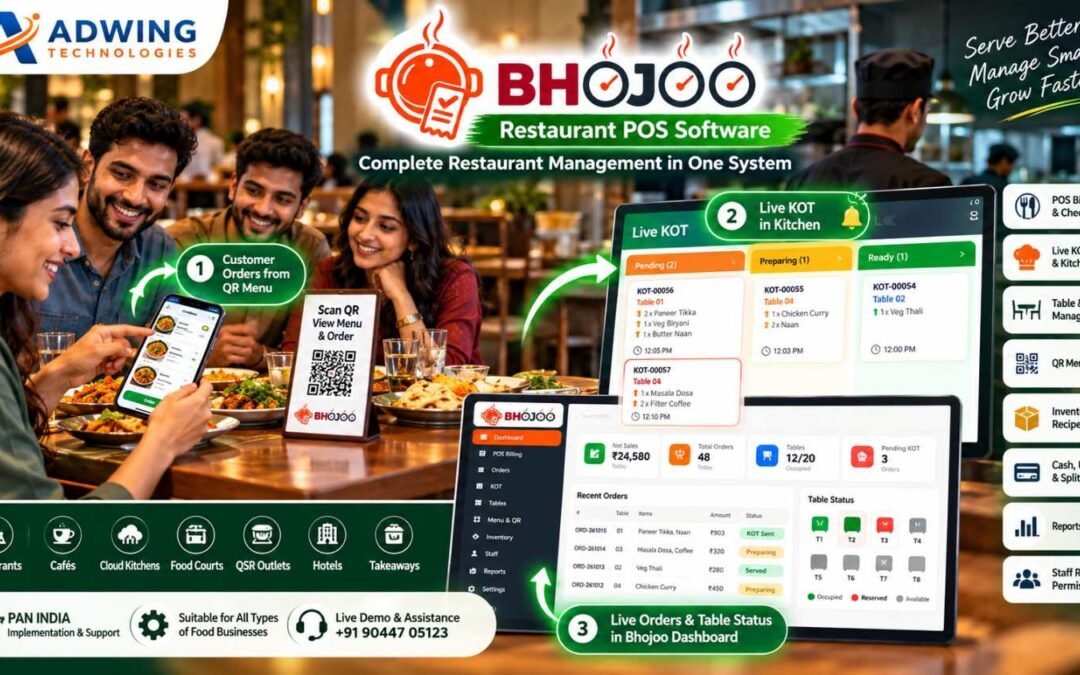
Bhojoo Restaurant POS Software in India | Billing, KOT, QR & Inventory
Restaurant POS Software in India – Run Your Restaurant Smarter with Bhojoo
Running a successful restaurant today is much more than preparing great food.
Restaurant owners have to manage billing, customer orders, kitchen communication, tables, payments, inventory, staff access and daily business reports—all while ensuring customers receive fast and accurate service. When these operations are handled through separate systems, handwritten KOT slips or manual records, mistakes and delays become much more likely.
This is why modern food businesses are moving towards an integrated Restaurant POS Software in India.
Bhojoo Restaurant POS Software by Adwing Technologies is designed to connect the complete restaurant workflow—from the moment a customer places an order until the final bill is settled and the transaction appears in management reports. Whether you operate a family restaurant, café, cloud kitchen, QSR, food court or growing restaurant business, Bhojoo gives your team one practical system for everyday restaurant operations.
What is Bhojoo Restaurant POS Software in India ?
Bhojoo is a restaurant management and POS platform designed around real restaurant workflows.
It connects the front counter, waiter, tables, kitchen, cashier and restaurant owner instead of treating each activity as an independent process.
A restaurant can use Bhojoo to handle:
- POS Billing and Checkout
- Dine-In, Takeaway and Restaurant Orders
- Live KOT and Kitchen Workflow
- Same-Table Repeat Orders
- Table and Floor Management
- Table Reservation
- QR Menu Ordering
- Menu Items, Categories and Rates
- Cash, UPI, Card and Split Payments
- Customer Bill and Final Settlement
- Inventory and Stock
- Recipe Costing
- KOT and Bill Printing
- Staff Roles and Permissions
- Order History
- Reports and Payment Summaries
- Audit and Controlled Corrections
- Mobile-Friendly Restaurant Operations
This connected structure gives restaurant owners better visibility over what is happening at the counter, on the restaurant floor and inside the kitchen.
1. Fast POS Billing for Restaurants
Billing is one of the most important areas of restaurant operations. During peak hours, customers should not have to wait while staff manually calculate totals or search through complicated billing screens.
Bhojoo provides a structured Restaurant POS Billing Software workflow where users can quickly select menu items, quantities, tax settings and applicable notes before creating the bill. The system is designed to support everyday restaurant billing for dine-in, takeaway and other configured order types.
This helps the counter team process orders more efficiently while keeping restaurant transactions connected with order history and reports.
Customer Bill Before Final Settlement
One useful restaurant workflow in Bhojoo is the separation between the customer bill and final settlement. The customer bill can be reviewed or printed first. The restaurant table or running order remains active until the cashier or authorized user completes final payment settlement. This is important because printing a bill does not always mean the customer has already paid. Bhojoo keeps that distinction clear.
2. Live KOT Management & Kitchen Display
A restaurant’s kitchen needs accurate information at the right time. Bhojoo’s Live KOT Management creates a direct operational connection between order entry and kitchen preparation. Kitchen orders can move through statuses such as:
Pending → Preparing → Ready → Served
This allows front-desk and kitchen teams to understand the progress of every active order. Instead of repeatedly asking whether a dish is ready, the operating team can follow the KOT status through the system. For busy restaurants, cafés and food courts, this can significantly improve kitchen coordination.
3. Same-Table Repeat Order with ADD KOT
Customers frequently add more items after the first order. A normal billing system may create another disconnected order, making the final bill and kitchen workflow confusing. Bhojoo handles this through a Same-Table Repeat Order workflow.
The running table remains connected to the original order. When additional items are ordered, Bhojoo can create an ADD KOT containing only the newly added items, while the customer still receives one combined final bill. This is particularly useful for dine-in restaurants where customers may order starters first, followed by main course, beverages or desserts later.
4. Modify, Cancel or Replace KOT with Control
Restaurant orders sometimes change after they reach the kitchen.
A customer may:
change quantity,
cancel an item,
replace one dish with another,
or cancel an entire KOT.
Simply overwriting the original order can create confusion and make it difficult for the owner to understand what happened. Bhojoo supports controlled KOT adjustment workflows so modifications remain operationally visible. This gives the kitchen clearer instructions while preserving better accountability.
5. Smart Table & Floor Management
For a dine-in restaurant, table visibility is essential. Bhojoo provides Table and Floor Management so restaurants can organise tables by areas such as:
Main Hall, Family Area, Rooftop, Ground Floor, Window Area or any restaurant-specific floor layout. The team can quickly identify table status such as available, occupied/running or reserved. Instead of depending on verbal communication between waiter and reception staff, the system gives the restaurant team a common table view.
Table Reservation
Restaurants can also manage reservations and keep the reservation status visible to authorised staff. This is useful for restaurants that receive advance table bookings, family reservations and special dining requests.
6. QR Menu Ordering – Customer Order Directly to Restaurant Workflow
One of Bhojoo’s strongest modern restaurant features is QR Menu Ordering. A guest can scan the restaurant QR code using a mobile phone and view the digital menu. The customer can browse categories and items, select food, choose the table where applicable, enter required information and place the order.
The order can then enter the restaurant workflow and become visible for KOT/kitchen processing. This creates a simple journey:
Customer scans QR → Opens Mobile Menu → Selects Items → Places Order → Order Reaches Restaurant → Live KOT → Kitchen Preparation
For restaurants that want to offer contactless ordering and modern digital menus, this can significantly improve the customer experience.
7. Menu, Categories, Price & GST Management
Restaurant menus change frequently. Prices change.
New dishes are introduced. Some items become temporarily unavailable.
Bhojoo allows restaurants to organise menu categories and maintain item information, prices, applicable tax/GST configuration, descriptions and availability. This gives restaurant operators more control without needing to recreate the complete menu whenever something changes.
8. Cash, UPI, Card & Split Payments
Indian restaurants receive payments through multiple channels. Bhojoo supports practical settlement modes such as:
Cash, UPI, Card and Split Payment.
Split Payment is especially useful when customers want to divide one restaurant bill between different payment modes.
For example:
₹1,000 Cash + ₹1,500 UPI + remaining amount by Card. Instead of creating separate bills, payment portions can remain connected to the same restaurant transaction.
9. Cash Received & Change Return
Cash transactions need accurate settlement. Bhojoo can record the amount received from the customer and calculate the change to be returned. This creates a clearer cashier workflow and reduces manual calculation during busy restaurant hours. Applicable round-off can also be handled so the final payable amount remains clear.
10. Payment Mode Correction with Audit History
Mistakes can happen.
A cashier may accidentally settle a UPI payment as Cash or choose the wrong payment mode. In a basic system, the user may have to delete or recreate the bill. Bhojoo provides controlled Payment Mode Correction for authorized users.
The correction can be made with a reason and maintained in the audit trail. This is far better for owner control because the original transaction history is not silently erased.
11. Settled Bill Void Approval
Cancelling a settled bill should never be an uncontrolled action. Bhojoo supports a controlled settled-bill void workflow where appropriate permissions and approval can be required. This gives restaurant owners better protection against unauthorized bill deletion or manipulation. For restaurants where multiple employees use the billing system, this is an important management feature.
12. Restaurant Inventory & Stock Management
Billing tells you what was sold. Inventory helps you understand what is left. Bhojoo provides restaurant inventory controls for stock items, stock movement, current balances and low-stock visibility. Restaurant owners can use this information to improve purchasing and reduce situations where important ingredients unexpectedly run out. For businesses with a large menu, inventory visibility becomes especially valuable.
13. Recipe Costing & Raw Material Consumption
Food cost is one of the biggest factors affecting restaurant profitability. Bhojoo can connect recipes with inventory to help understand raw-material consumption associated with menu items. For example, selling a dish may affect the related ingredient stock according to the configured recipe structure. This helps restaurant management move beyond simple billing and develop better visibility over food cost and stock usage.
14. Role-Based Login for Admin, Cashier, Waiter & Kitchen
Every employee should not have access to every restaurant control. Bhojoo can separate access according to staff responsibility.
A waiter may need tables and orders. Kitchen staff need KOT and preparation status. A cashier needs billing and settlement.
The owner or admin requires reports, permissions, sensitive corrections and configuration. Role-based access helps restaurant owners maintain better operational security.
15. Restaurant Reports & Owner Dashboard
Restaurant owners need more than a total sales figure. Bhojoo brings important operational information together through dashboards and reports. Owners can review information related to sales, orders, tables, KOT activity, payments and restaurant transactions.
Payment summaries can help distinguish Cash, UPI, Card and Split collections. This makes daily reconciliation easier and provides management with a clearer picture of restaurant activity.
16. Order Search, History & Audit Trail
Restaurant operations create hundreds or thousands of transactions over time. When an owner needs to check an old order, investigate a correction or understand why a payment was changed, proper history becomes extremely important. Bhojoo keeps searchable order records and supports audit visibility for sensitive activities such as KOT adjustments, payment corrections and controlled void actions.
This improves accountability across restaurant operations.
Restaurant POS Software for Different Food Businesses
Bhojoo is suitable for different restaurant formats, including family restaurants, cafés, casual dining restaurants, QSR outlets, food courts, takeaway businesses, cloud kitchens, hotel restaurants and growing restaurant chains. The exact workflow can be configured according to the number of tables, counters, users and kitchen operations.
Restaurant POS Software Across India
Bhojoo is positioned for restaurants across India with remote product demonstration, setup guidance and support from Adwing Technologies. That means a restaurant does not need to be located near the Adwing Technologies office to discuss or evaluate Bhojoo.
Whether your restaurant operates in Delhi, Noida, Ghaziabad, Mumbai, Pune, Bengaluru, Hyderabad, Chennai, Kolkata, Ahmedabad, Jaipur, Lucknow, Varanasi, Prayagraj, Mirzapur or another Indian city, the Bhojoo workflow can be demonstrated remotely according to your restaurant requirements. The objective is not to force every restaurant into the same configuration.
The number of tables, order type, kitchen workflow, users, billing process and reporting requirements should be understood before implementation.
Why Bhojoo is More Than Basic Restaurant Billing Software
Many POS applications focus primarily on generating bills. But a restaurant operates through a much longer workflow.
A real restaurant cycle may look like:
Table Selection → Customer Order → KOT → Kitchen Preparation → Repeat Order → Bill → Payment → Table Release → Reports
Bhojoo is built around this connected restaurant process. It also handles the exceptions that happen in real restaurants—repeat orders, changed KOTs, cancelled items, split payments, payment mistakes and controlled voids. This is what makes Bhojoo more than a simple restaurant billing application.
Benefits of Using Bhojoo Restaurant Management Software
For restaurant owners, the main benefit is better operational control. A connected system can help reduce billing confusion, improve kitchen communication, maintain clearer table status, track payment modes, monitor inventory and provide stronger visibility into daily restaurant activity.
For restaurant staff, a structured workflow can make everyday responsibilities easier to understand. For customers, faster service and accurate order processing can create a better dining experience.
Bhojoo Restaurant POS Demo – See the Complete Workflow
Choosing restaurant software only by reading a feature list is not enough.
The best way to evaluate Bhojoo is to see how it handles your actual restaurant workflow. During a demonstration, you can review areas such as: POS Billing, Table Management, Live KOT, Same-Table Repeat Orders, QR Ordering, Customer Bill, Final Settlement, Cash/UPI/Card/Split Payment, Inventory, Staff Permissions and Reports.
Share your restaurant name, number of tables, order workflow and important requirements with Adwing Technologies to arrange a Bhojoo demonstration.
Live Demo & Enquiry: +91 90447 05123
Conclusion – Bring Your Complete Restaurant Workflow into Bhojoo
Restaurants need speed at the counter, accuracy in the kitchen and control for the owner.
Managing these areas through separate registers or disconnected applications makes restaurant operations unnecessarily difficult.
Bhojoo Restaurant POS Software brings POS billing, orders, Live KOT, tables, QR ordering, payments, inventory, staff access and reports into one connected restaurant management workflow.
If you are looking for a Restaurant POS Software in India, Restaurant Billing Software, KOT Software, Cafe POS System or complete Restaurant Management Software, Bhojoo is designed to give restaurant teams a practical system for daily operations while giving owners stronger business control.
Bhojoo – Manage. Operate. Grow.
Frequently Asked Questions
What is Bhojoo Restaurant POS Software?
Bhojoo is restaurant management software designed to handle POS billing, restaurant orders, Live KOT, tables, QR menu ordering, payments, inventory, staff permissions and management reports.
Can Bhojoo manage repeat orders on the same table?
Yes. New items can be added to an existing running table while an ADD KOT is generated for the newly ordered items and the final bill remains combined.
Does Bhojoo support QR menu ordering?
Yes. Bhojoo supports a mobile-friendly QR menu and restaurant ordering workflow so customers can browse menu items and place orders through their phones.
Can Bhojoo manage restaurant kitchen orders?
Yes. Live KOT can track kitchen orders through operational statuses such as Pending, Preparing, Ready and Served.
Which payment modes are supported?
Restaurant settlements can support Cash, UPI, Card and Split Payment workflows.
Does Bhojoo have inventory management?
Yes. Bhojoo provides stock management, stock transactions, current stock visibility and low-stock controls, with recipe-costing support.
Can access be restricted for restaurant employees?
Yes. Roles and permissions can be configured for users such as Admin, Cashier, Waiter and Kitchen staff.
Is Bhojoo suitable for cafés and cloud kitchens?
Yes. Bhojoo can be considered for restaurants, cafés, food courts, takeaway businesses, QSRs, cloud kitchens and other food-service operations.
Is Bhojoo available across India?
Bhojoo is promoted for restaurants across India, with remote demonstration, implementation guidance and support available from Adwing Technologies.
How can I request a Bhojoo demo?
Contact Adwing Technologies at +91 90447 05123 and share your restaurant name and operational requirements to discuss a live demonstration.